Using Online Listing Management Insights
Listings Insights provides information about the impact and ROI of listings, as well as local performance of listings compared to competitors.
Note: The Insights feature offers a wealth of valuable data to help you understand and optimize your listings. For a comprehensive overview, we highly recommend exploring the Listing Insights article available on the free Yext Hitchhikers platform.
There are three screens in Listings Insights. The Performance screen will display data to all businesses using OPM. However, the Visibility and Map screens will display data only for businesses using Competitive Intelligence (Advanced OPM).
Performance tab
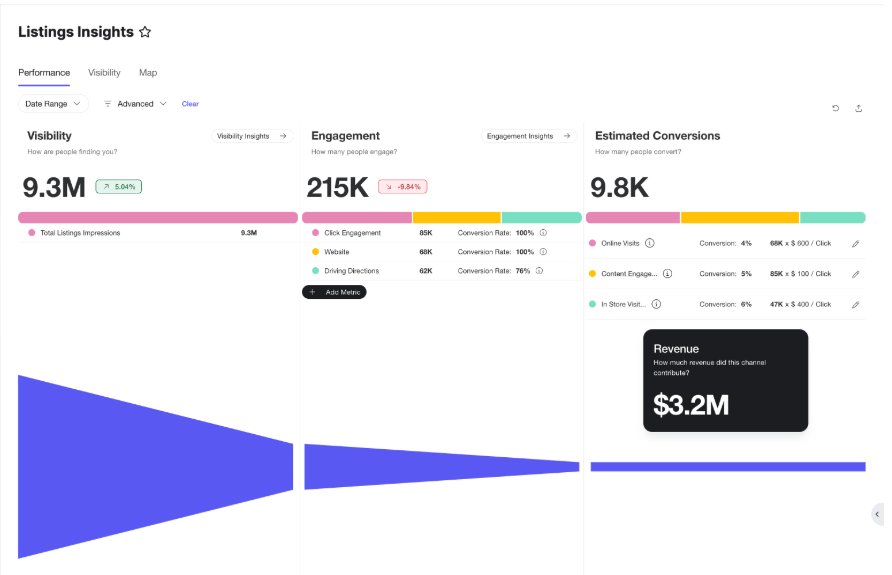
The Performance tab displays a Listings conversion funnel, from Visibility (how many people are finding your listings), to Engagement (how people are interacting with your listings), to Estimated Conversions (how many people who interact with your listings are also interacting directly with your business.
You can use the filter options at the top of the page to filter the funnel by date range, or advanced criteria (entity data or folders). You can also customize the numbers in the Estimated Conversions stage of the funnel to match your business goals for conversion rates and estimated revenue. Estimated Conversions insights
Setting your estimated conversion rate and revenue
Insights helps you visualize the impact of your listings with a conversion funnel from Visibility (where your listings are being viewed), to Engagement (what actions users are taking on your listings), to Estimated Conversions (the estimated revenue from users who engage with your listings).
You can set your own values for conversion rates and estimated revenue based on your business goals.
- Within the Estimated Conversions section, listing engagement is grouped into four conversion types:
- Content Engagement: Action that indicates interest in information ahead of making a purchase. Includes general interaction with content such as promotional messages, products, menus or liking a business page.
- Digital Lead: Action that expresses interest in initiating contact with a business. Includes clicks to Apply Now and Order Now CTAs, as well as clicking to call or email.
- In-Store Visit: Action that indicates intent to visit a physical location, or confirms a physical visit if supported by the platform. Includes using Driving Directions and check-in engagement.
- Online Visit: Action that indicates intent to visit the business’s website or leads to more information on the business page.
- Click the pencil icon next to any conversion type to edit the conversion rate and estimated revenue values.
- Enter your desired conversion rate and revenue estimate for that conversion type.
- Click the save icon to save your changes.