Mapping Earning Codes from RUN to Meevo 2
Now that you connected Meevo 2 to RUN, you can map earning codes / deductions in RUN with commission types in Meevo 2. Mapping ensures that your employees' earnings in Meevo 2 are allocated to the appropriate earning codes in RUN.
- If you have not already, follow the steps in Connecting Meevo 2 to RUN.
- From the ADP Settings page, select the Pay Options tab.
- The column on the left lists all commission settings in Meevo 2 (Wages, Overtime, Commission, Tips, and Deductions). The column on the right is where you will select the corresponding RUN earning code of your choice. You must map each row in order to save.
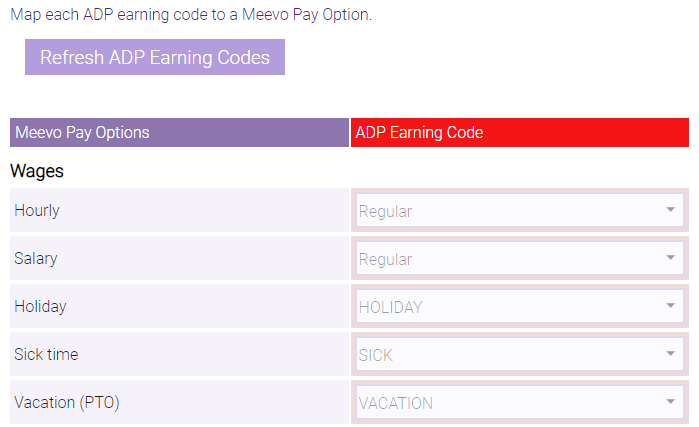
- Important notes if you have Deductions set up in Meevo 2:
- For the Services Deduction and Services Override Deduction fields, you'll map to ADP Earning Codes, not to ADP Deduction Codes. ADP Deduction Codes aren't selectable from the drop-downs by design, as the deduction associated with the ADP Earning Code is translated as a negative value in RUN.
- In Meevo 2, if your deductions are set up to be applied before commission is calculated, the Services Deduction and Services Override Deduction fields will not be sent to ADP because the calculation already occurred prior to the payroll data being sent. If deductions are set up to be applied after commission is calculated, then the Services Deduction and Services Override Deduction fields will be sent to ADP because in that scenario, the deductions did not yet occur.
- When finished, select Save.