Aveda Empowered Ordering Integration Frequently Asked Questions
The Aveda Empowered Ordering Integration is free with Meevo and provides an added benefit for businesses using Aveda products by allowing you to quickly submit Meevo purchase orders directly to Aveda Empowered Ordering. You can submit a particular Purchase Order to Aveda only once. Once the PO is submitted:
- You can log into the Aveda Empowered Ordering system to apply promotions to your order, adjust any open orders, or finalize your order.
- Editing the Purchase Order in Meevo will not update the PO that was submitted to Aveda. Updating an open Aveda PO must be done through Aveda Empowered Ordering.
- Deleting the Purchase Order in Meevo will not delete the PO that was submitted to Aveda.
Requirements
- You must know your Aveda ID to use this integration. If you do not know your 6-digit Aveda ID number, please contact Aveda at 800.892.5608. If you do not have an Aveda Account but would like to inquire about one, please contact Aveda at www.joinaveda.com or by calling 877.622.5917.
- This integration uses the default barcode alone, not SKU or Product Code. It will not work using custom barcodes on Aveda products.
- Aveda Empowered Ordering is not available in the following states: Alabama, Arkansas, Florida, Louisiana, Mississippi, New York, Oklahoma, Tennessee, and Texas.
How do I set up and use the Aveda Empowered Ordering integration?
- Add the integration to Meevo from the MeevoXchange.
- Configure the integration.
- Submit a purchase order to Aveda. Occassionally, you may need to resolve errors in Aveda Purchase Orders.
How does the Aveda Empowered Ordering integration work with Central Office and multiple locations?
In a Central Office / multi-location environment:
- Central Office can configure which distributors will be used with the Aveda Empowered Ordering integration.
- Individual locations can add to that list of distributors for their location only, but cannot remove distributors added by Central Office. Each location must also enter their 6-digit Aveda ID.
I am an Aveda Concept Salon or Spa. Can I add my Online Booking URL to Aveda's website?
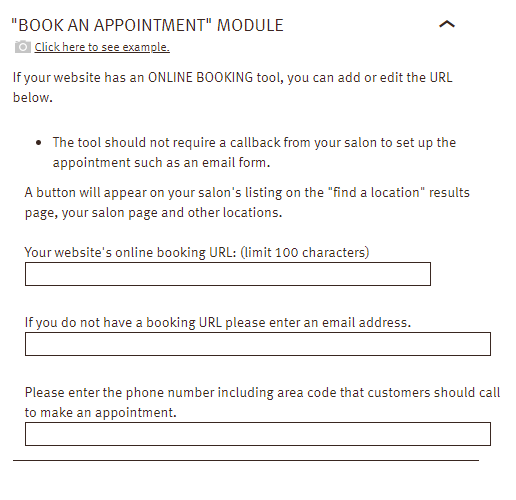
Yes! If your business is an Aveda Concept Salon or Spa and you are listed on Aveda's site, adding your Online Booking URL will display a Book Now button beside your business name. From your account on Aveda Pure Pro, go to My Profile > Show My: Contact Info > My Location > Online Presence. Scroll down to the BOOK AN APPOINTMENT MODULE. There, you can enter your Online Booking URL in the Your website's online booking URL field.