Using Manual Merge
Do client profiles get merged immediately after I select Save?
No; client profiles are merged overnight, when the merge service runs. You can undo or make changes to the scheduled merge up until that time.
To manually merge client profiles
- Type manualmerge into the Convobar, or go to Meevo > Management > Manual Merge Clients.
- Select Edit.
- Select a Primary Client Profile. Remember, fields are merged using the same rules as Intelli-Merge, except for one major difference: In Manual Merge, the final profile's name will always come from the Primary client profile.
- Select a Duplicate Client Profile. You can add as many as needed by selecting Add Duplicate Client Profile.
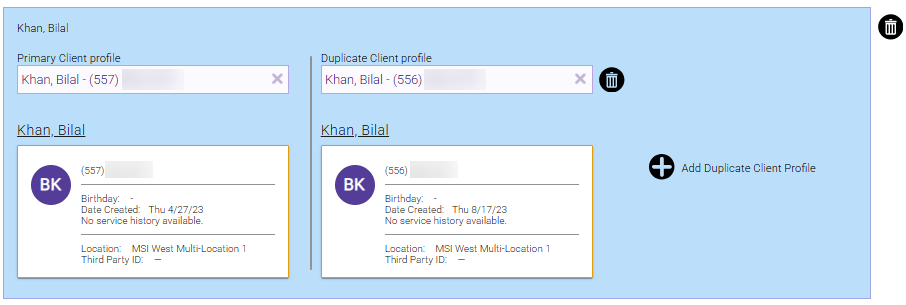
- If you want to merge another group of profiles, you can select Add Manual Merge Group and repeat steps 3 and 4 above.

- When ready, select Save to schedule the profile merges. The merge will take place at 12 am local time, unless you undo your changes beforehand.