Viewing Delivered Reports
Note: This topic also applies to delivered Royalty Exports.
When and how are reports delivered?
Reports are generated based on the schedule and one-hour time range selected during setup. Reports are delivered as links via email, text message, or both. Links to the report are delivered shortly after the report is finished generating. The report itself can be secured with a unique, one-time system-generated PIN. Generated reports are hosted in the cloud, and recipients are sent links to the reports via email or text message notifications.
Note: If a Daily report is not accessed for 2 weeks, a Weekly report is not accessed for 4 weeks, or a Monthly report is not accessed for 3 months, the scheduled report is deactivated and its generated reports become inaccessible.
How does the one-time PIN work?
When security is enabled for a scheduled report, the recipients will be unable to access the report until they each enter a unique, one-time alphanumeric PIN. When the recipient selects the report link in the text message or email, the recipient is brought to the Enter your verification code page. At the same time, the PIN is randomly and automatically generated and sent to the recipient via the same method (for example, if the recipient selects the link in a text message, the recipient will receive the PIN number via text a short time later). Recipients will follow this process each time they want to view a secured report.
Note: Generated PINs are valid for 5 minutes after they are created.
What happens if a scheduled report fails to generate?
If a scheduled report fails to generate for any reason, the scheduled report is inactivated and a notification is sent to all recipients.
To view delivered reports without a PIN
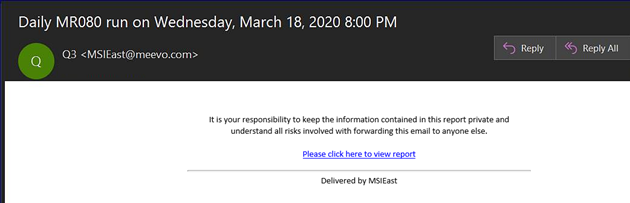
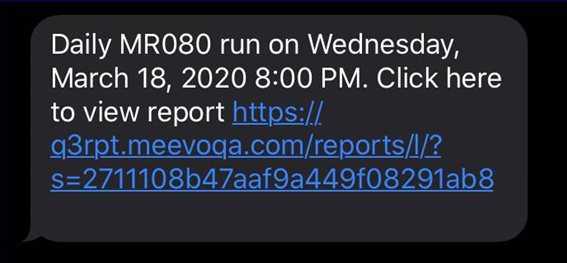
To view delivered reports that do not require a PIN, simply select the link in your text message or email.
Email delivery
Text message delivery
To view delivered reports with a PIN
When the recipient selects the link in the text message or email, the recipient is brought to the Enter your verification code page. At the same time, the PIN is randomly and automatically generated and sent to the recipient via the same method (for example, if the recipient selects the link in a text message, the recipient will receive the PIN number via text shortly thereafter).
The recipient enters their PIN and selects Verify. Upon validation of the PIN, the recipient can then view the report.