Overview of Receipts
See below for an example receipt and description of each section:
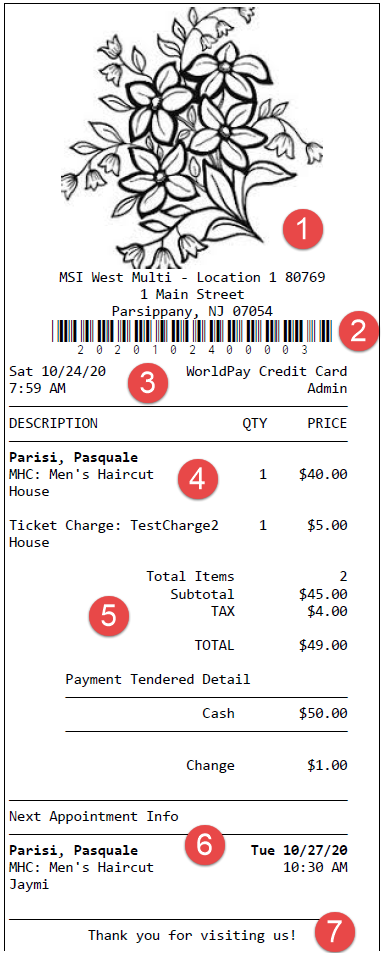
- Business name, address, and image pulled from Business Information > Main. Voided transaction receipts will have *VOIDED TRANSACTION across the top of the receipt.
- Transaction number and corresponding barcode, which coincide with the Transaction # in Transaction Editor.
- Date, time, register drawer used, and the user who executed the transaction.
- Transaction details, which include client name, purchased items and quantity of each, price, and credited employee.
Note: The following sale types do not include a credited employee on the receipt: membership payments/EFTs, waived membership dues, client account credits and payments, and egift processing and shipping fees.
- Totals and payment method and amount, change due, etc. Tip will not appear here if no tip was applied. If Gratuity was included, the employee name and tip amount appear on the bottom of the receipt.
- The content here may vary:
- If the client redeemed a package, the client, package number, and number of items remaining appear here in a Package Remaining section (not shown).
- If the client has a future appointment booked, those services appear here in Next Appointment Info. You can control how many future appointments appear here via a Business Information setting. If the Central Office option Print the client's next appointment on receipts regardless of location is enabled in Business Information, this will print the future appointment, regardless of location. Otherwise, the next appointment displays on the receipt only if the appointment is at the same location as the one finalizing the transaction and printing the receipt.
- Any remaining active gift card balances, and their expiration dates, appear below the next appointment information if the option to show balances on receipts is enabled in Business Preferences.
- If a client attempts a card transaction without sufficient funds, the word Reversal may appear on the bottom of the receipt. In some cases, any available funds will still be processed as a partial transaction. If this partial transaction does not appear in Meevo, please contact Support for assistance.
- The receipt message as defined in the Drawer's maintenance form.
Note: When a gift card is purchased or reloaded, emailed receipts will display the last 4 digits of the gift card.