Setting Service Booking Priority
What is Service Booking Priority?
Service Booking Priority allows you to define the order that Service Categories should be booked for a single appointment. For example, for a given appointment, a haircut should come after coloring, so the Haircut category would appear after the Color category in your priority list. This priority would be applied when Meevo uses Scan for Opening, which occurs in Online Booking, Booking Agent, and the Convobar, for example.
To set up Service Booking Priority
- Type businfo into the Convobar, or go to Meevo > Business Settings > Business Information.
- Select the Service Booking Priority tab.
- Select Edit.
- Enable Set Service Booking Priority Order.
- Select Add Service Category and select a category from the drop-down.
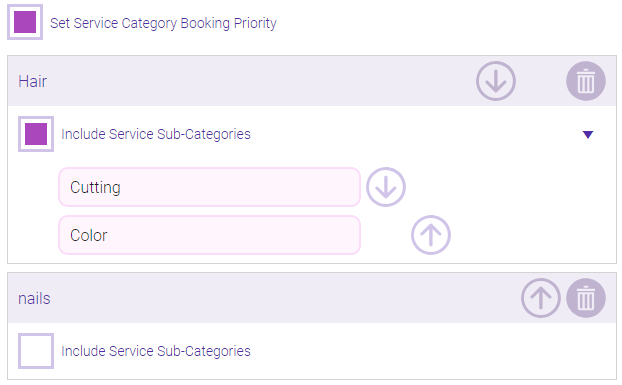
- The Service Category appears in the list. If desired, you can select Include Service Sub-Categories to reveal that category's sub-categories. Use the arrows to reorder the priority of the listed categories and sub-categories. In the example below, Hair and nails are the Service Categories, while Cutting and Color are sub-categories of Hair.
- You can add as many Service Categories as desired. When finished, select Save.