Adding a Third-Party Gift Card Merchant Account
What is a third-party gift card?
A third-party gift card is a gift card that is sold at a retailer other than your business.
How do I set up Meevo to accept third-party gift cards?
- In Central Office, enter your gift card's Bank Identification Number (BIN) on the Gift Card Integrations screen. The BIN number identifies the institution issuing the card, and it is usually the initial four to six numbers that appear on the card.
- At a location, select your account provider and your Merchant Identification Number (MID) through the Merchant Account screen, where you will set up a separate merchant account specifically for third-party gift cards. The MID is a unique number assigned to your merchant account that identifies your account during processing.
How does a client redeem third-party gift cards?
Third-party gift cards are redeemed at the register just like any other gift card, with the following exceptions:
- To redeem a third-party gift card or check its balance at the register, you can scan the card's barcode or enter the barcode number. The magnetic strip on the card cannot be used for either of these purposes.
- Third-party gift cards cannot be reloaded or reused.
To add a third-party gift card merchant account
Note: Be sure to also define the BINs for your third-party gift cards; otherwise, Meevo will not be able to recognize them during payment processing.
- Go to Meevo > Register > Merchant Accounts, or type merchacct into the Convobar.
- Select the Main tab.
- Select VantivGC as the Account Provider.
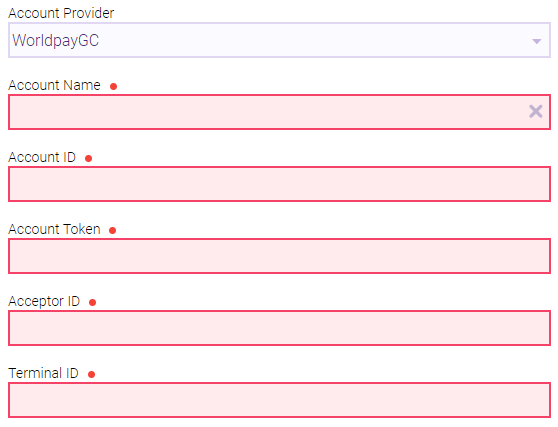
- Enter the Account Name, Account ID, Account Token, Acceptor ID, and Terminal ID information you obtained through Worldpay (formerly Vantiv).
- When finished, select Save.